

Google is removing one of Gmail’s most useful features for small businesses. But you don’t need an expensive Google Workspace subscription to keep using your professional email address.
For years, Gmail offered a convenient way to manage multiple email addresses from one inbox. You could receive messages from your business domain and reply using that address, all through Gmail’s familiar interface but that’s coming to an end.
According to Google’s official announcement, starting in January 2027, Gmail will discontinue its “Send as” functionality for third-party email accounts.
For freelancers, startups, and small businesses that rely on free Gmail to manage custom-domain email, this creates an unnecessary headache.
At REX5, my approach is straightforward: keep professional email hosting affordable, retain control of the domain, and avoid paying for an entire productivity suite just to send emails.
What Exactly Is Google Removing?
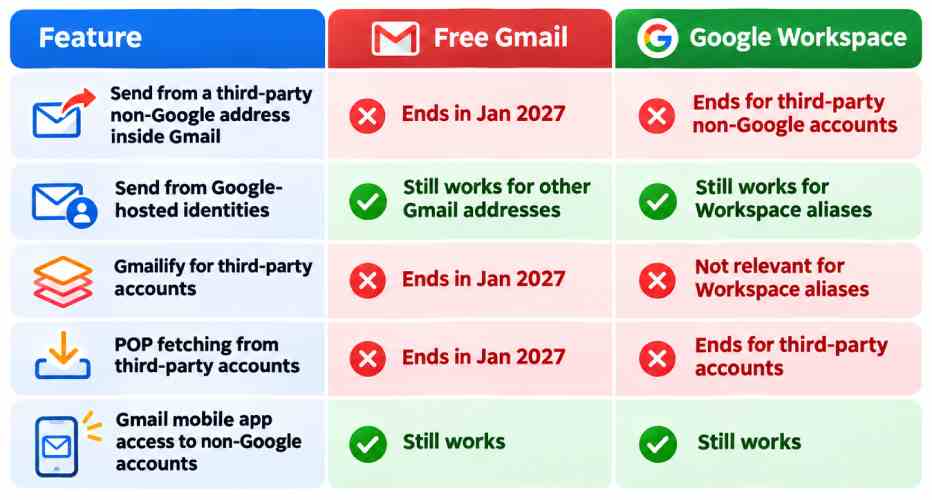
Three important features are affected:
- Send as: You will no longer be able to send messages from third-party email addresses through Gmail’s web interface or mobile apps (Google Workspace is explicitly exempt)
- POP fetching: Gmail will stop automatically importing messages from external accounts through POP.
- Gmailify: Gmail’s enhanced inbox features for external accounts will disappear.
Google Workspace aliases and other Google-hosted addresses are not affected.
Importantly, Gmail’s mobile app will continue supporting external email accounts. This is not the end of third-party email access everywhere, just the end of certain integrations.
The REX5 Approach: Separate Email Hosting From Gmail
At REX5, I prefer keeping infrastructure simple and avoiding unnecessary recurring expenses.
Instead of depending on Gmail’s “Send as” feature, my approach uses Hostinger as an affordable email hosting provider.
Hostinger offers custom-domain mailboxes, SMTP for outgoing messages, IMAP for synchronized inbox access, and its own webmail interface.
That means a business address such as contact@yourcompany.com can operate independently of Gmail.
The setup is relatively simple:
- Host the business mailbox with Hostinger. Create email accounts using your own domain.
- Configure DNS authentication. Set up MX records for incoming mail and SPF, DKIM, and DMARC for sender authentication and protection against spoofing.
- Send emails through Hostinger. Use Hostinger’s webmail or configure an email client such as Thunderbird, Outlook, or Apple Mail using SMTP.
- Keep Gmail for incoming messages if desired. Hostinger supports forwarding emails to Gmail, although forwarding can encounter authentication and delivery issues.
How Much Can You Save?
As of November 2026, Hostinger advertises its Starter email plan at $0.39 per mailbox per month, prepaid for 48 months, renewing at $1.59 per month on another 48-month term.there
For comparison, Google Workspace Business Starter is listed at approximately $7 per user per month.
Of course, this isn’t an apples-to-apples comparison. Google Workspace includes Drive, Docs, Meet, and many other tools. But if you only need professional email, paying for the entire Workspace ecosystem may be unnecessary.
Final Thoughts
Google’s decision is another reminder that convenient platform features can disappear, even after years of becoming part of our daily workflows.
For REX5, the lesson is simple: own your domain, separate essential services, and avoid unnecessary vendor dependency.
